
Good Solutions’ Integration API provides a standardized and secure way for customers to read and write data to and from RS Production.
The API is open and well documented, allowing customer developers to create customized solutions that fit their needs.
See the full technical documentation here: https://api.goodsolutions.se/swagger/index.html
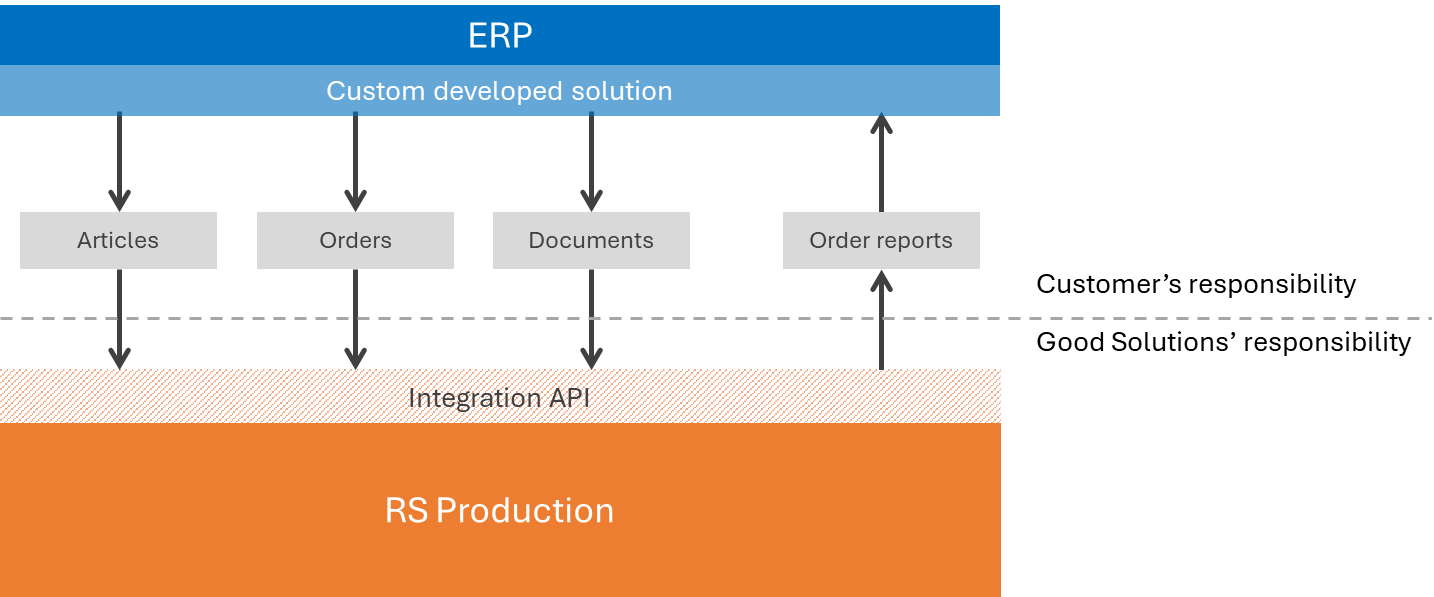
How the RS Production Integration Interface works
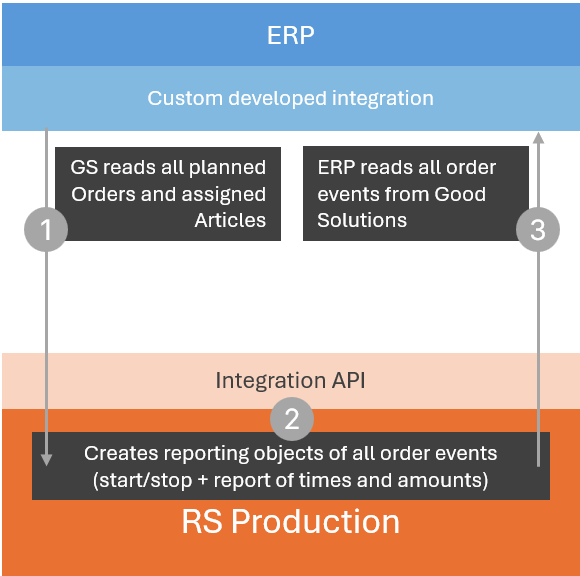
The integration connects the customer’s ERP system with RS Production in three steps:
-
Send production data to RS Production
The integration continuously updates RS Production with articles and production orders from the ERP system. -
Create production reports
When something happens to an order—such as production starting or stopping, or time, produced quantity or scrap being reported—RS Production creates a reporting record. -
Update the ERP system
The integration retrieves these reporting records from RS Production and uses them to update the relevant production orders in the ERP system.
Competence required to integrate wtih your ERP
The customer needs an integration developer or ERP consultant who understands the customer’s ERP system and has experience working with REST APIs, JSON and authentication. Good Solutions supports the developer in understanding the RS Production API but does not write the customer-side integration code.
Typical work steps to integrate with your ERP
The work normally includes mapping data between the two systems, configuring access, developing the three integration flows, handling errors and retries, testing with real production orders, and deploying the integration.
Estimated effort
For an experienced integration developer, a standard implementation typically requires approximately 2-3 working days. The actual effort depends mainly on the ERP system, data quality, existing integration tools and any customer-specific requirements.
Integration Options
One-Way ERP Integration
Send data from your ERP system into RS Production.
If an object doesn’t already exist, it will be created automatically.
If it does exist, it will be updated with any new information.
You can create or update the following objects:
-
Articles
-
Orders
-
Documents
Two-Way ERP Integration
Read back the production reports created in RS Production and update your ERP system with the reported data.
You can retrieve:
-
Order reports
Order sniff ERP Integration
Let RS Production start and stop production orders based on events in your ERP system (or other system).
-
Start, pause, stop production order
Details per Integration Type
One-Way ERP Integration
Articles
Create or update articles in RS Production.
-
Article Key:
ArticleNumber(a new article is created if not found) -
ArticleName: Article description
-
ArticleType: Used to group similar articles in reports
Orders
Create or update production orders in RS Production.
-
Order Key:
OrderNumber+OperationNumber(defaults to 0 if omitted) -
PlanningGroups: List of group names where the order can be started (commonly machine names)
-
TargetedAmount: Planned production quantity
-
PlannedStart: Scheduled start date/time
-
PlannedFinish: Estimated completion date/time
-
OrderInfo: Short free-text information for operators
-
OptimalCycleTime: Target cycle time in seconds (supports decimals)
-
SetupTime: Setup time in seconds (supports decimals)
-
UnitsPerCycle: Units produced per cycle
-
Priority: Order priority
-
OrderStatus: Descriptive order status
-
ReportNumber: Reference number for report retrieval
-
Documents: List of documents connected to the order
-
If a document is removed from this list, it is automatically unlinked from the order
-
Documents
Create or update documents linked to articles or orders.
-
Document Key:
FileLocationandName -
DocumentType: File type (case insensitive)
Supported values:-
PDF
-
RSDocument
-
Excel
-
TextFile
-
WebPage
-
WindowsExplorer
-
Word
-
Other
-
-
IsPublished: Visible to operators (defaults to true if omitted)
-
RequireConfirmation: Operators must confirm they have read it
-
InfoFlash: Shows as popup/alert to operators
-
DisplayStart: When the document becomes visible
-
DisplayEnd: When the document expires and is no longer shown
Two-Way ERP Reporting
Retrieve production data reported in RS Production since your last sync.
The following fields are available:
|
Field |
Description |
|---|---|
|
reportNumber |
Report ID |
|
orderNumber |
Order reference |
|
created |
Creation timestamp |
|
consumed |
Consumption timestamp |
|
startReport |
Start report data |
|
partReport |
Partial report data |
|
pauseReport |
Pause report data |
|
finalReport |
Final report data |
|
setupTime |
Total setup time |
|
productionTime |
Active production time |
|
reportedAmount |
Reported good quantity |
|
reworkAmount |
Reported rework quantity |
|
scrappedAmount |
Reported scrap quantity |
|
printFlag |
Print indicator |
|
printFlagQuantity |
Quantity related to print flag |
|
operatorName |
Name of reporting operator |
|
producingUnitName |
Machine or unit name |
|
operationNumber |
Operation step number |
|
planningGroups |
Associated planning groups |
|
staffingLevel |
Active staffing level |
|
setupStaffingLevel |
Staffing level during setup |
|
mannedDowntime |
Logged downtime with staff present |
|
mannedActiveTime |
Logged active production time |